Thursday, May 26, 2022

No such property: docker for class: groovy.lang.Binding | Jenkins Pipeline Error Docker Build | Jenkins docker pipeline error

 Jenkins Pipeline Error: 

groovy.lang.MissingPropertyException: No such property: docker for class: groovy.lang.Binding.

We most likely encountered the same issue, in order to fix it, install Docker Pipeline plugin in Jenkins:

Root Cause and Fix:

Jenkins need to have Docker Pipeline plug-in to perform Docker builds.

Jenkins > Manage Jenkins > Manage Plugins > Available tab

Search for Docker Pipeline install it, restart Jenkins and you are ready to go.


Tuesday, May 24, 2022

How to check whether my user data passing to EC2 instance is working | AWS EC2 bootstrap script log

The cloud-init output log file (/var/log/cloud-init-output.log) captures console output so it is easy to debug your scripts following a launch if the instance does not behave the way you intended.

Check the Logs in EC2 instance

Login to EC2 instance, and type the below command:

tail -f /var/log/cloud-init-output.log

This will give the output of bootstrap execution

Monday, May 23, 2022

error: exec plugin: invalid apiVersion "client.authentication.k8s.io/v1alpha1"

Kubectl Error:

you may get this error when ever you are running kubectl command

error: exec plugin: invalid apiVersion "client.authentication.k8s.io/v1alpha1"

Solution: 

Make sure you update kubeconfig with below command:

aws eks update-kubeconfig --name ${EKS_CLUSTER_NAME} --region ${REGION}


Thursday, May 12, 2022

AWS, Azure Cloud and DevOps Coaching Online Classes | Mar 2023 Schedule

Are you in IT? Tired of your work? Are you not able to make any good progress in your career? 

Are you not having a job? Looking for a break in IT? Are you interested in learning DevOps? 
 
Did you get laid off from your previous job due to Covid-19
 
You are in the right place to kick start your career in DevOps. DevOps is one of the top and hot IT skills right now. Currently almost all the employers are struggling to get right resources in their teams who can do the DevOps and automation work..You could be that person by attending this coaching program.

DevOps Coaching Classes schedules for Mar 2023(currently enrollment is going on)

DateTimeTypeWhen?
Mar 6th6:00 to 8:00 PM CSTWeekdaysMondays/Wednedays
Mar 18th09:45 AM CST to 11:20 AM on Saturdays
10:30 AM CST to 12:30 PM CST on Sundays
WeekendsSat/Sundays

DevOps Coaching Highlights:

- Comprehensive hands on knowledge on Git, Jenkins, Maven, SonarQube, Nexus, Terraform, Ansible, Puppet, Docker, AWS IAM, ECR, Docker registry. AWS and Azure cloud platforms.

- Coach is having about 23+ yrs of professional IT experience, 8+ Yrs in DevOps/Cloud/Automation.

- Many students already got placed in reputed companies from this coaching program successfully.

- Working as a Sr.DevOps Coach/Architect in a one of the top IT services companies in USA.

- Unique program...less theory, more hands on lab exercises...
 
Resume preparation will be done with candidates personally.

One-to-one Interview coaching.

- Coaching is purely hands on with 101% job relevant.

100% Job assistance.

- Coached about 1300+ people successfully for past 4 and half years and many of my students got placed with many large enterprises in DFW, Charlotte, Houston, Austin, Chicago, Florida, Seattle, Bay area, Ohio, NJ and NY areas..

To join coaching classes, please contact coach below through email or phone number:

Contact no # : +1(469)733-5248
Email id: devops.coaching@gmail.com
Contact: Coach

If you live in India, please contact assistant coach Gunal to learn about the program:

Name - Gunal

Email id: gunal.j0907@gmail.com

Contact no: +91 87600 02237

Tuesday, May 3, 2022

stderr: remote: Bitbucket Cloud recently stopped supporting account passwords for Git authentication. remote: App passwords are recommended | Fix for this issue | How to Create app passwords in Bitbucket?

When you are creating any freestyle jobs or pipeline jobs in Jenkins, when you try to checkout a project from Bitbucket and If you are using Bibucket password, you may get this error.

Reason for this error:

Beginning March 1, 2022, Bitbucket Cloud users will no longer be able to use their account passwords when using Basic authentication for Git over HTTPS and the Bitbucket Cloud REST API. The removal of account password usage for Basic authentication when using Git over HTTPS and/or the Bitbucket Cloud REST API is due to Bitbucket Cloud's ongoing effort to align with internal infrastructure and improve Atlassian account security. App passwords are substitute passwords for a user's account and are designed to be used for a single purpose with limited permissions.


How to Create App Passwords in Bitbucket?

Go to Bitbucket--> Settings
Click on App passwords --> Create app password


Now enter label name and click on read/write under repositories

Click on Create, this will generate app password.
Now you can this app password in Jenkins.

Provision Ubuntu 18.0.4 EC2 Instance | How to create EC2 instance in AWS console | Launch Ubuntu 18.0.4 instance in AWS

 How to create EC2 instance in AWS console using new UI experience?

What is EC2 instance? 

It is virtual server provided by AWS. We will be using this EC2 to setup both Jenkins and Tomcat. Please follow the below steps to create an EC2 instance.

Watch here for live demo:

Steps:
1: Login to AWS console by clicking this link -->  https://aws.amazon.com/console/
click on All services, Click on Compute -->  Click on EC2


2. Click on Launch instance


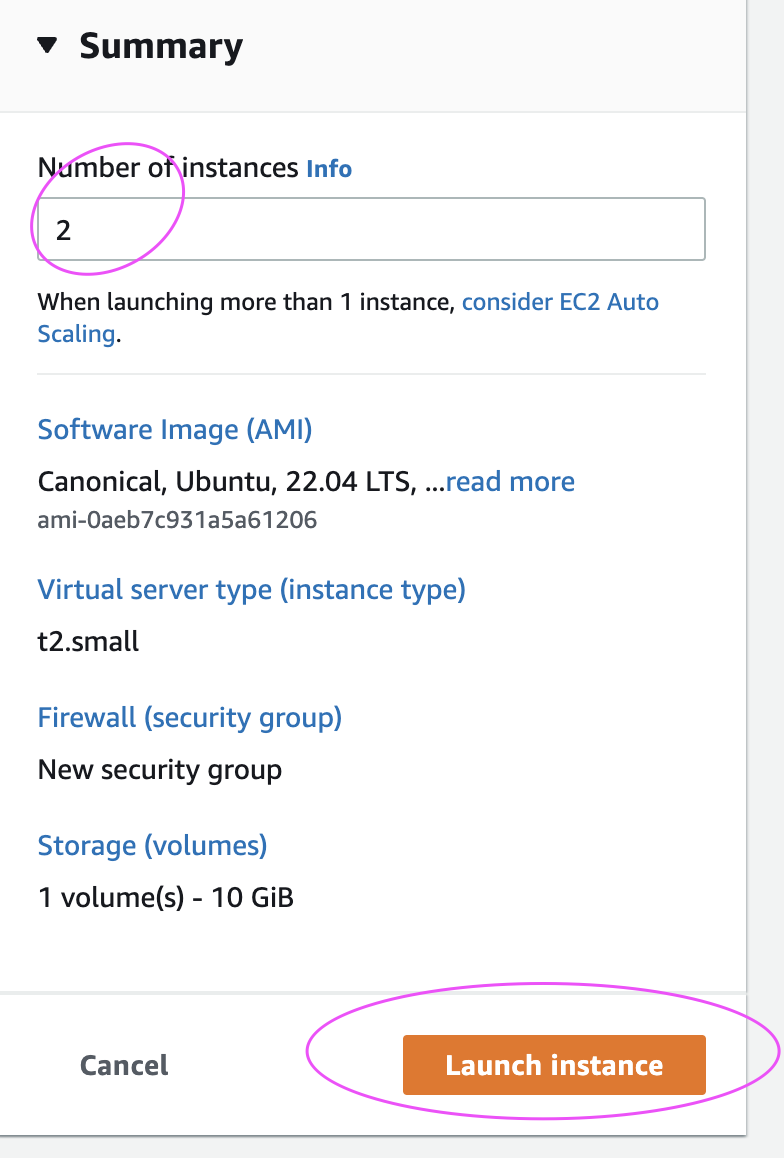
3. Enter Name as EC2 and enter 2 as number of instances


4. Select Ubuntu and choose Ubuntu server 18.0.4 as AMI


5. Enter t2.small as instance type
6. Click on Create new Key Pair


7. Choose the existing key pair if you have one, otherwise create new one, give some name as myJenkinsKey. Make sure you download the key in your local machine. Please do NOT give space or any character while naming the key.


8. Under Network settings, Click Edit


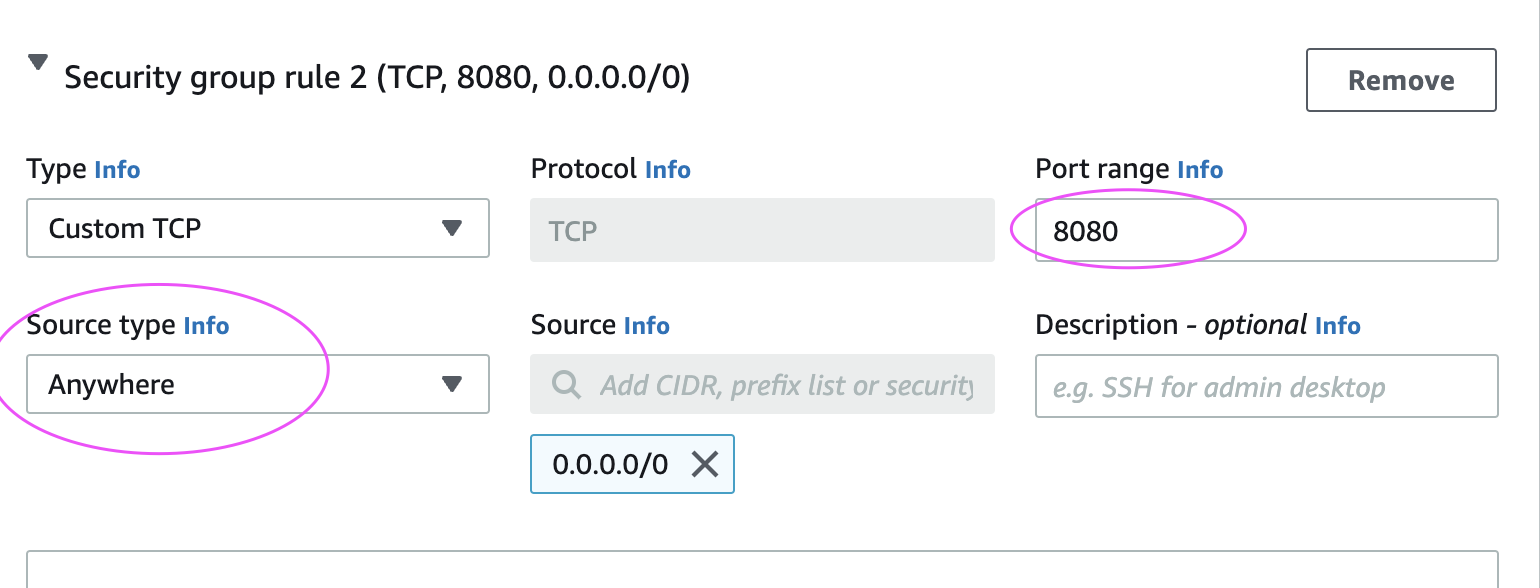
Add port range as 8080 and select AnyWhere as Source Type, that should enter 0.0.0.0/0 as Source

9. Enter 10 GB as storage 
And then make sure in Summary, values appear as below:


10. Click on Launch Instance.

Click on View instances

Now you should be able to view instances in AWS console.


Connect to EC2 instance from local machine:
Please click the below link to understand the steps for connecting to EC2 instance from your local machine - windows or Apple laptop.

http://www.cidevops.com/2018/02/how-to-connect-to-ec2-instance-from.html