Here is the fix boto3 required for this module error:
You need to install Phython Pip manager first.
sudo apt install python-pip
then install Boto3 module using Pip
sudo pip install boto boto3
Showing posts with label Boto. Show all posts
Showing posts with label Boto. Show all posts
Friday, March 16, 2018
Tuesday, March 6, 2018
How to Install Ansible on Ubuntu - How to setup Ansible on Ubuntu 22.0.4
Here are the steps for installing Ansible on Ubuntu 22.0.4:
The best way to install Ansible for Ubuntu is to add the project's PPA (personal package archive) to your system. you can do it by executing the below command:
Update Repository
sudo apt-add-repository -y ppa:ansible/ansible

then you need to refresh the package by executing the below command:
sudo apt update

Now you can install Ansible:
sudo apt install -y ansible

sudo apt install python-pip -y
( this is just comment - Package manager for python)
Install Boto Framework
sudo pip install boto
(This is AWS SDK for python)
sudo pip install boto3
sudo apt-get install python-boto -y
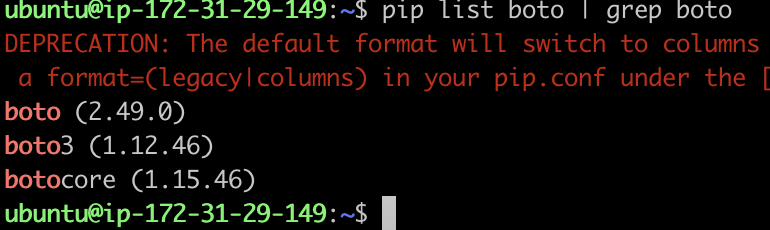
pip list boto | grep boto (the above command should display below output)
Ignore warning in Red color.

ansible --version
you will see this output..
ansible 2.9.6
config file = /etc/ansible/ansible.cfg
configured module search path = [u'/home/ubuntu/.ansible/plugins/modules', u'/usr/share/ansible/plugins/modules']
ansible python module location = /usr/lib/python2.7/dist-packages/ansible
executable location = /usr/bin/ansible
python version = 2.7.12 (default, Dec 4 2017, 14:50:18) [GCC 5.4.0 20160609]
sudo pip install boto3
sudo apt-get install python-boto -y
pip list boto | grep boto (the above command should display below output)
Ignore warning in Red color.
ansible --version
you will see this output..
ansible 2.9.6
config file = /etc/ansible/ansible.cfg
configured module search path = [u'/home/ubuntu/.ansible/plugins/modules', u'/usr/share/ansible/plugins/modules']
ansible python module location = /usr/lib/python2.7/dist-packages/ansible
executable location = /usr/bin/ansible
python version = 2.7.12 (default, Dec 4 2017, 14:50:18) [GCC 5.4.0 20160609]
Subscribe to:
Posts (Atom)
-
 Let's learn how to connect to an EC2 instance running in AWS from your local machine. Your local machine can be Windows laptop or MacBoo...
 -
 We get these questions a lot from the teams we are coaching at my customer's work place How to create microservices? How to break...
 -
 Amazon Elastic Container Registry (ECR) is a fully managed container registry service provided by Amazon Web Services (AWS). It allows user...