We will learn how to automate springboot microservices builds using Jenkins pipeline and Deploy into AWS EKS Cluster with help of Kubernetes CLI plug-in.
We will use Springboot Microservices based Java application. I have already created a repo with source code + Dockerfile. The repo also have Jenkinsfile for automating the following:
- Automating builds using Jenkins
- Automating Docker image creation
- Automating Docker image upload into AWS ECR
- Automating Docker Containers Deployments to Kubernetes Cluster
- Automating Docker image creation
- Automating Docker image upload into AWS ECR
- Automating Docker Containers Deployments to Kubernetes Cluster

Watch steps in YouTube channel:
Same Code for this video is here:
Make sure you fork my repo https://github.com/akannan1087/springboot-app
Pre-requisites:
1. Amazon EKS Cluster is setup and running. Click here to learn how to create Amazon EKS cluster.
1. Amazon EKS Cluster is setup and running. Click here to learn how to create Amazon EKS cluster.
5. Docker, Docker pipeline and Kubernetes CLI plug-ins are installed in Jenkins


Step # 1 - Create Maven3 variable under Global tool configuration in Jenkins
Make sure you create Maven3 variable under Global tool configuration.

Step #2 - Create Credentials for connecting to Kubernetes Cluster using kubeconfig
Click on Add Credentials, use Kubernetes configuration from drop down.

use secret file from drop down.

execute the below command to login as jenkins user.
sudo su - jenkins
you should see the nodes running in EKS cluster.
kubectl get nodes

cat /var/lib/jenkins/.kube/config

Open your text editor or notepad, copy and paste the entire content and save in a file.
We will upload this file.

Enter ID as K8S and choose File and upload the file and save.

Enter ID as K8S and choose enter directly and paste the above file content and save.
Step # 3 - Create a pipeline in Jenkins
Create a new pipeline job.


Step # 4 - Copy the pipeline code from below
Make sure you change red highlighted values below as per your settings:
Your docker user id should be updated.
your registry credentials ID from Jenkins from step # 1 should be copied
Make sure you change red highlighted values below as per your settings:
Your docker user id should be updated.
your registry credentials ID from Jenkins from step # 1 should be copied
pipeline {
tools {
maven 'Maven3'
}
agent any
environment {
registry = "account_id.dkr.ecr.us-east-2.amazonaws.com/my-docker-repo"
}
stages {
stage('Cloning Git') {
steps {
checkout([$class: 'GitSCM', branches: [[name: '*/main']], doGenerateSubmoduleConfigurations: false, extensions: [], submoduleCfg: [], userRemoteConfigs: [[credentialsId: '', url: 'https://github.com/akannan1087/springboot-app']]])
}
}
stage ('Build') {
steps {
sh 'mvn clean install'
}
}
// Building Docker images
stage('Building image') {
steps{
script {
dockerImage = docker.build registry
}
}
}
// Uploading Docker images into AWS ECR
stage('Pushing to ECR') {
steps{
script {
sh 'aws ecr get-login-password --region us-east-2 | docker login --username AWS --password-stdin account_id.dkr.ecr.us-east-2.amazonaws.com'
sh 'docker push account_id.dkr.ecr.us-east-2.amazonaws.com/my-docker-repo:latest'
}
}
}
stage('K8S Deploy') {
steps{
script {
withKubeConfig([credentialsId: 'K8S', serverUrl: '']) {
sh ('kubectl apply -f eks-deploy-k8s.yaml')
}
}
}
}
}
}
Step # 5 - Build the pipeline
Once you create the pipeline and changes values per your configuration, click on Build now: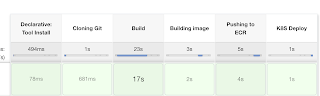
Step # 6 - Verify deployments to K8S
kubectl get pods

kubectl get deployments

kubectl get services


Steps # 7 - Access SpringBoot App in K8S cluster
Once build is successful, go to browser and enter master or worker node public ip address along with port number mentioned above
http://loadbalancer_ip_address
You should see page like below:

Note:
Make sure you fork my repo https://github.com/akannan1087/springboot-app
and make changes in eks-deploy-k8s.yaml to pull Docker image from your AWS ECR repo.


887004FB0C
ReplyDeleteTakipçi Satın Al
Instagram Profil Görme
Offshore Hosting
The article provides a practical look at automating Spring Boot microservices deployment with Jenkins and Amazon EKS. I like how the workflow connects several stages of the delivery process, from building the application and creating Docker images to pushing them into Amazon ECR and deploying the containers to Kubernetes. The use of a Jenkinsfile and Kubernetes CLI plugin also makes the automation approach easy to follow.
DeleteFor developers working with Java-based applications, a Spring Boot Angular Full Stack Developer Course can provide useful context for understanding how Spring Boot applications fit into larger full-stack development workflows. The article demonstrates how a Spring Boot microservices application can move beyond development into containerized and automated deployment.
31C02723
ReplyDeleteVéletlenszerű csevegés
Losowy czat
Випадковий чат
Náhodný chat
随机聊天
Trò chuyện ngẫu nhiên
Tilfældig chat
แชทแบบสุ่ม
Случайный чат
1C9135D7
ReplyDeleteBayburt
Düzce
Yalova
Bingöl
Isparta
Kilis
Manisa
Aydın
Urfa
The deployment pipeline also highlights the importance of understanding the underlying Java application alongside DevOps tooling. Concepts such as Maven builds, Docker containerization, Jenkins pipelines, and Kubernetes deployment become especially useful when applied to real Java applications. A Java Full Stack Developer Course can help developers build the application-side foundation needed to work effectively with this kind of automated deployment process.
ReplyDelete7A91D6DA
ReplyDeleteDikili
Nusaybin
Çiğli
Batıkent
Beykoz
Milas
Meram
Balçova
Anamur
AE6D51CB
ReplyDeleteÇayyolu
Ereğli
Bafra
Sivrihisar
Arsuz
Korkuteli
Fethiye
Kırıkhan
Gökçeada