I'm having trouble accessing logs (or anything else) via az-cli.
i'm getting the below error:
 Get Token request
returned http error: 400 and server response:
{"error":"invalid_grant","error_description":"AADSTS50173: The provided
grant has expired due to it being revoked}.
Root cause:
If you did not connect to your azure account for long time, you may get this error. or if you stopped and started azure VM, you may get into this issue.
Solution:
You need to login to Azure account using CLI.
1. az account clear
2. try az login using your latest password, the one you can login azure portal.
We will learn how to automate Docker builds using Jenkins. We will use
Python based application. I have already created a repo with source code
+ Dockerfile. We will see how to create Docker image and upload into AWS ECR successfully. We will not be using AWS access keys to upload image into ECR, we will be using IAM role and attach to Jenkins instance to access ECR.
1. Jenkins is up and running
2. Docker installed on Jenkins instance. Click here to for integrating Docker and Jenkins
3. Docker and Docker pipelines plug-in are installed
4. Repo created in ECR, Click here to know how to do that.
5. Make sure port 8096 is opened up in firewall rules.
6. Create an IAM role with AmazonEC2ContainerRegistryFullAccess policy, attach role to Jenkins EC2 instance
7. Make sure AWS cli is installed in Jenkins instance.
Step # 1 - Create a pipeline in Jenkins, name can be anything
Step # 2 - Copy the pipeline code from below
Make sure you change red highlighted values below:
Your account_d should be updated and repo should be updated.
pipeline { agent any environment { registry = "acct_id.dkr.ecr.us-east-1.amazonaws.com/your_ecr_repo" }
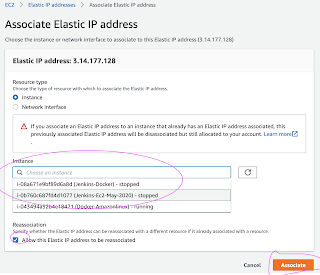
Elastic IP address is static IP address provided by AWS, you should
avoid using public ip address as it changes every stop/start of EC2
instance. How to create Elastic IP address:
Go to AWS console, Click on EC2, Elastic IPs.
Click on Allocate Elastic IP address
Now it should create Elastic IP address.
Click
on Actions, Associate Elastic IP address and choose your instance from
Instances textbox and pick up the Private ip address automatically.
That's it! Elastic IP(static) address have been assigned to your EC2 instance.
You can clean workspace using Workspace cleanup pluginin Jenkins after builds executions.
Install workspace clean up Plug-in
Free Style Job Workspace - cleanup
Go to your existing freestyle job, click on Post-Build actions --> Select Delete workspace when build is done option.
Now
run the job. You should be able to see workspace is cleaned up after
build is done inside Jenkins node. You will not see any folder with job
name, in Ubuntu usually under /var/lib/jenkins/workspace/
Pipeline Job Workspace - cleanup code
Go to your existing pipeline job, you can code something like this below:
pipeline {
agent any
tools {
maven 'Maven3'
}
stages {
stage ("checkout") {
steps {
checkout logic here
}
}
stage ('build') {
steps {
sh "mvn clean install -f MyWebApp/pom.xml"
}
}
}